Capture Anything
Catch thoughts, voice notes, screen captures, and web research the instant they happen without breaking your flow.
The most critical moment in thinking happens in two seconds. If capturing an idea requires opening three windows, finding a folder, and typing metadata, the idea evaporates before you can write it down.
Nowted is engineered for instantaneous, frictionless capture across text, voice, screen regions, and web intelligence.
1. Instant Voice Notes & Voice Outlines
When your hands are full or thoughts are moving faster than you can type, speak them.
Nowted includes a native, on-device audio studio:
- One-Tap Voice Notes: Click the microphone icon in the editor toolbar, or press the global recording hotkey (Ctrl + Alt + K on Windows/Linux, ⌘ + ⌥ + K on macOS) from anywhere in your operating system.
- On-Device Whisper AI: Your voice recording automatically transcribes into clean, searchable text using local Whisper. There are zero cloud server uploads, zero audio data harvesting, and zero latency.
- Voice Outlines in Threadlines: Speak freely and watch your ideas organize into structured, nested bullet trees. Once spoken, you can fold sections, zoom into individual branches, and drag points to reorder your thinking effortlessly.
 Nowted•Global Voice Capture Overlay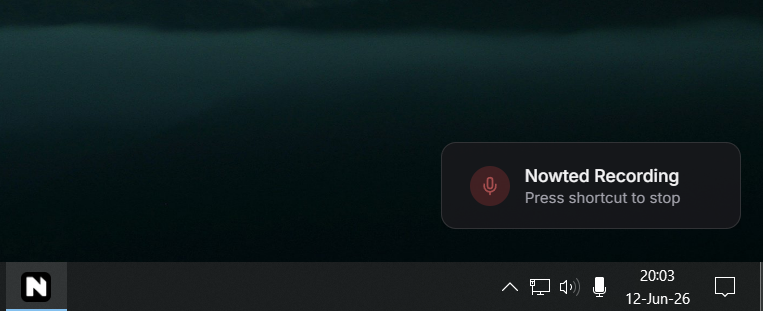
Your microphone input is processed directly by your computer's local hardware. Unlike cloud apps that stream voice data to third-party servers, your speech never leaves your physical machine.
2. Screen Snapping & Instant Image Annotation
A visual screenshot says more than ten paragraphs of description. Nowted provides a built-in, multi-monitor screen capture overlay paired with an annotation toolkit.
Global Crosshair Snapping
Hit the global screen capture shortcut from anywhere in your system:
- Drag the crosshair across any window or monitor region.
- The captured region opens immediately in the Image Annotator.
The Precision Annotation Suite
Edit and clarify your screenshot before saving:
- Precision Arrows: Draw straight, curved, or dotted arrows to pinpoint exact UI elements.
- Numbered Callout Badges (
1,2,3...): Drop sequential numbered badges across the image to create immediate visual step-by-step guides. - Pencil & Geometric Shapes: Rectangles, circles, and freehand lines in semantic colors.
- Privacy Redaction Blur / Pixelate: Instantly blur passwords, API tokens, client emails, or financial balances with one brush stroke.
- Precision Crop: Trim borders to isolate the essential focal point.
Nowted•The Precision Image Annotation Suite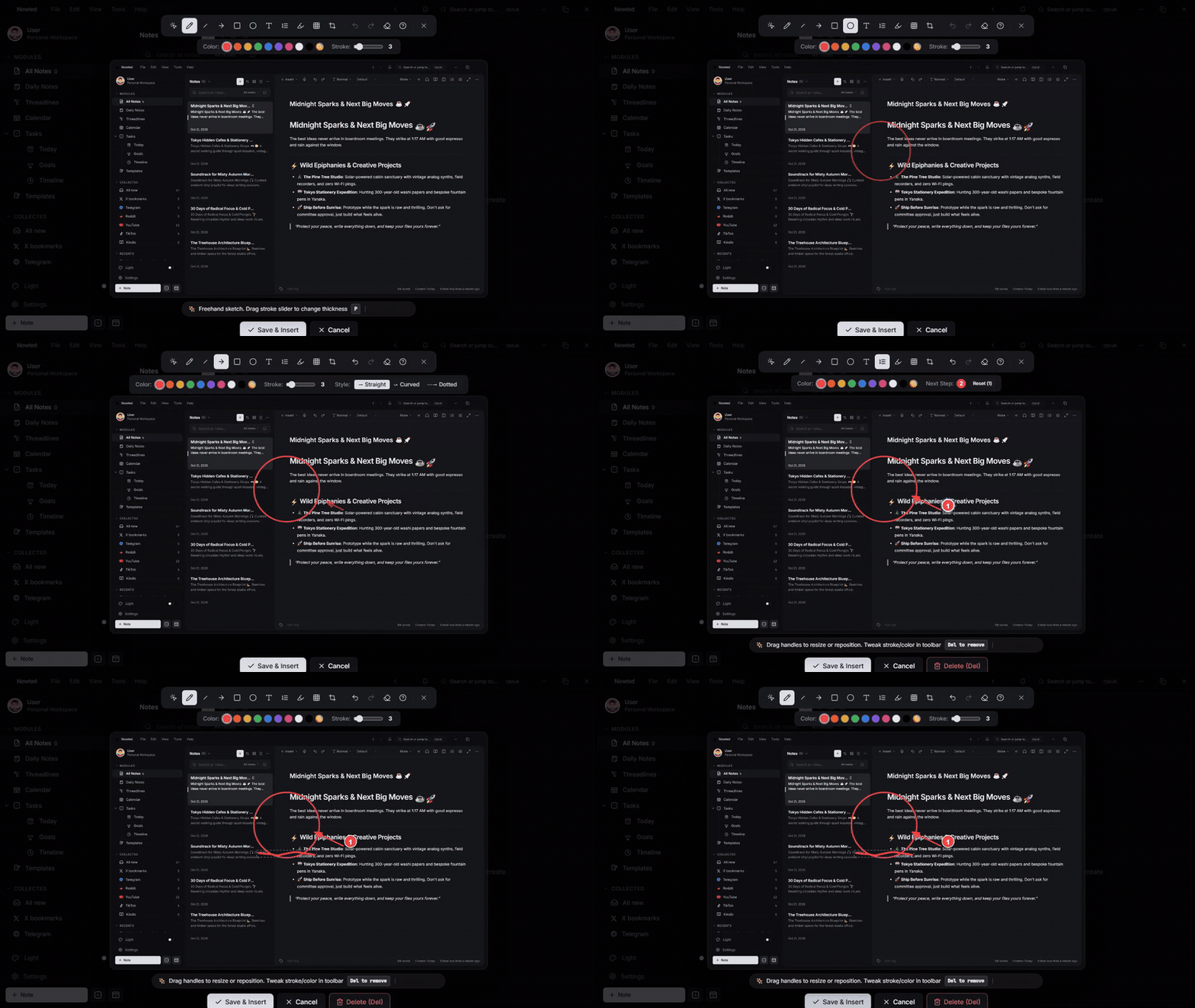
Once finalized, click Save: the annotated screenshot saves directly into your Inbox as an actionable note. Any image already sitting in your notes can also be clicked and annotated anytime.
Never worry about leaking confidential client data. Use the Redaction Blur tool directly inside the capture overlay to scrub sensitive numbers in under three seconds before saving.
3. The Web Clipper: Clean Articles, Transcripts & AI Chats
The internet is filled with valuable research buried under ads, popups, and paywalls. The Nowted browser extension captures pure signal and discards the noise.
Nowted•The Web Clipper HUD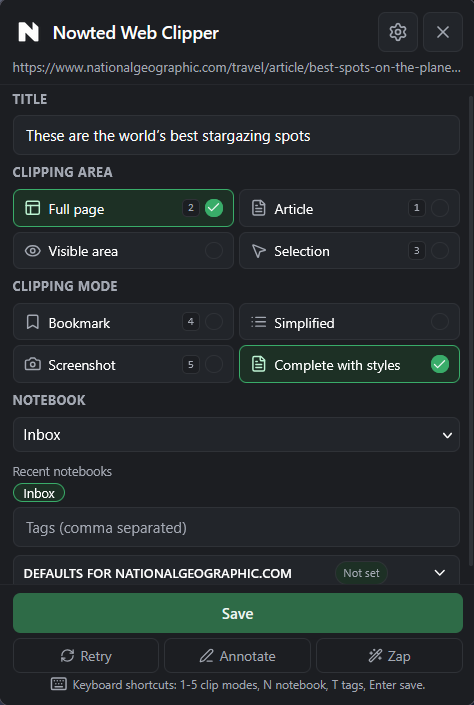
Four Power Modes
- Clean Article Stripping: Removes banners, cookie popups, and tracking scripts, preserving clean typography and inline images directly in local Markdown.
- YouTube Transcripts: Clip any YouTube video to embed the playable video plus the entire searchable, timestamped transcript directly inside the note.
- Living AI Chats: Save research conversations from AI tools. When you continue the conversation tomorrow, clip it again: Nowted recognizes the existing note and appends only the new messages with zero duplicates.
- Visual Snipping: Capture clean visual screenshots with the source URL permanently attached.
4. Collected: Automated Social & Web Stream Synchronization
Every platform gives you a bookmark button: YouTube Watch Later, TikTok Favorites, Reddit Saved Posts, X (Twitter) Bookmarks, Telegram Saved Messages, Kindle Highlights, and browser bookmarks.
The reality? Bookmarks are where great ideas go to die. You save an insightful thread or technical breakdown in the heat of the moment, and it vanishes into an isolated cloud silo that you never open again. Your knowledge fragments across seven proprietary apps with zero cross-platform search.
Collected changes the paradigm entirely. Instead of leaving bookmarks stranded across the internet, Nowted automatically synchronizes your saves into a unified, local-first triage stream right inside your personal workspace.
Nowted•Collected: Automated Social & Web Stream Synchronization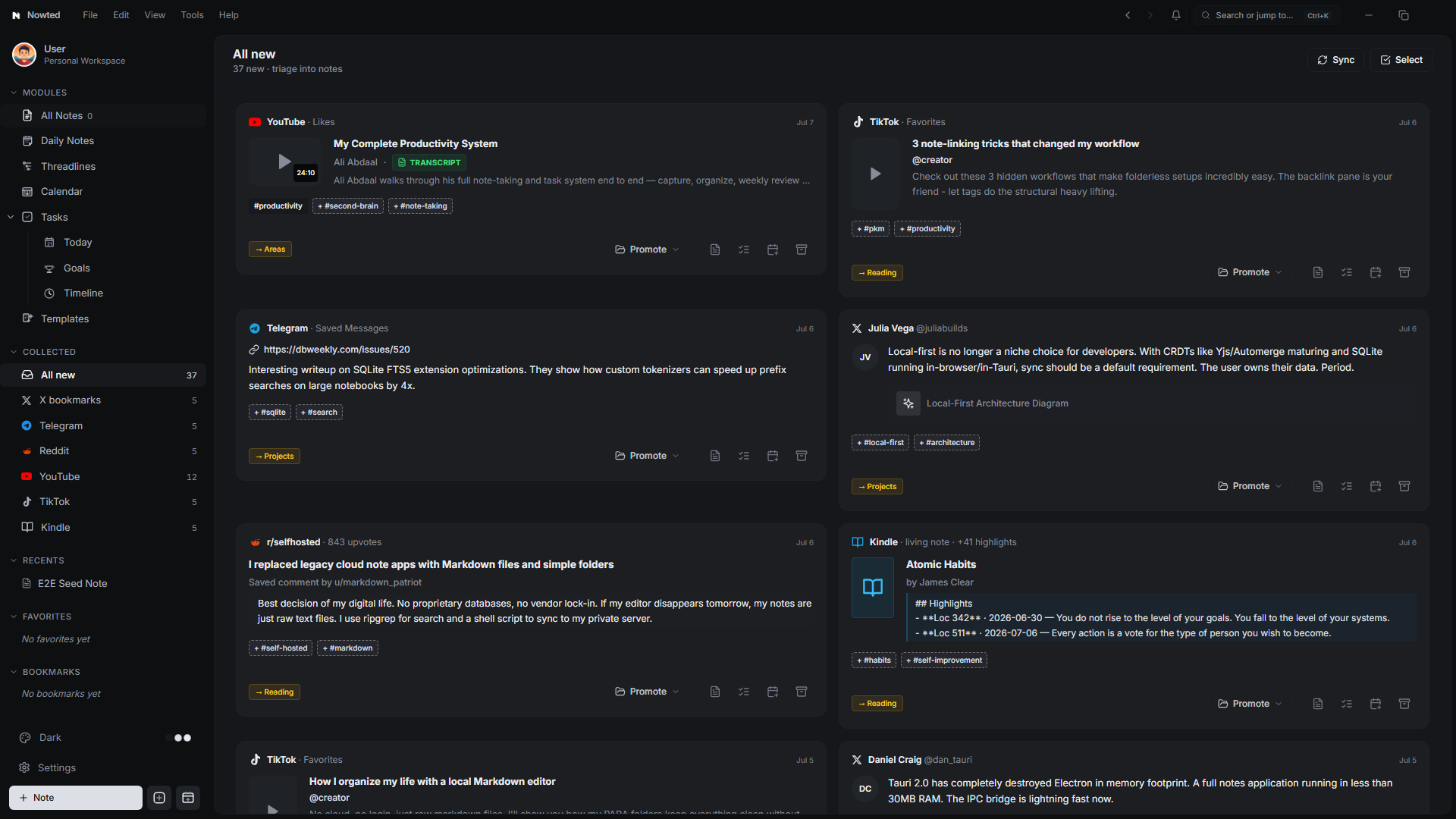
Continuous Ingestion Across Your Digital Life
Collected bridges the gap between passive consumption and active execution with native representations for every major network:
Liked and bookmarked videos sync directly to your library with high-resolution thumbnails, channel verification badges, durations, and full timestamped transcripts ready for instant text quoting.
Viral engineering threads, visual architecture diagrams, and creator discussions pull into structured cards with automatic tag suggestions and notebook routing.
High-signal community discussions and upvoted technical answers from subreddits like r/selfhosted or r/reactjs are captured in clean, permanent Markdown.
Short-form coding hacks, UI design animations, and visual tutorials cataloged with creator attribution and video previews.
Forward voice notes, whiteboard photos, code snippets, or links to your private Nowted bot; voice messages are transcribed locally and ready for review.
Living note synchronization that pulls distilled passages, book covers, and exact location markers from your Kindle library directly into your reading shelf.
Any URL, article, or PDF clipped from your desktop browser extension routes instantly into your triage queue.
Sub-50ms Universal Search Over Everything You've Ever Saved
Because Collected stores every item locally on your machine, your saved knowledge is never held hostage behind slow cloud APIs or rate limits:
- Instant Full-Text Retrieval: Powered by SQLite FTS5, Nowted searches through the body text of thousands of tweets, Reddit comments, and entire hour-long YouTube transcripts in under 50 milliseconds.
- 100% Offline Access: Read your bookmarked threads, review transcripts, and study saved tutorials on a flight or off the grid without an internet connection.
Zero-Friction Triage: From Passive Bookmark to Active Output
Collected is engineered as an actionable staging queue, not an endless hoard:
- Promote to Note (P): With one click or keystroke, transform any collected item into a permanent, editable Markdown note inside your designated notebook (
Projects,Areas,Reading, orInbox). - Convert to Task (T): Immediately convert a tutorial or reading recommendation into an actionable task with due dates and priority on your Execution Board.
- Batch Triage & Archive (E): Use the bulk action bar to assign tags, route batches of clips into project folders, or archive triaged items to keep your stream pristine.
Stop treating open browser tabs or scattered mobile bookmarks as a fake to-do list. Let Collected silently gather your discoveries in the background. When you sit down for deep work, your entire web discovery stream is already organized, indexed, and waiting for you.
Was this guide helpful?
Your feedback helps us continuously refine the documentation.