The Complete Tasks & Execution Engine
A high-performance execution engine where tasks aren't shallow checkboxes—they carry their full intellectual context, linked notes, and momentum.
Most task managers are digital guilt traps. You open them on a busy Monday and are greeted by twenty bright glowing red overdue alarms. Your amygdala triggers an emergency response; instead of feeling like you are in a calm command center, you feel anxiety, failure, and cognitive overwhelm.
This is the primary reason people repeatedly abandon their task managers.
Nowted takes a fundamentally different approach: it is designed as an active anti-procrastination partner. It unites deep intellectual thinking with effortless daily execution.
 Nowted•The Execution Engine in Action — Satisfying Momentum & Zero Friction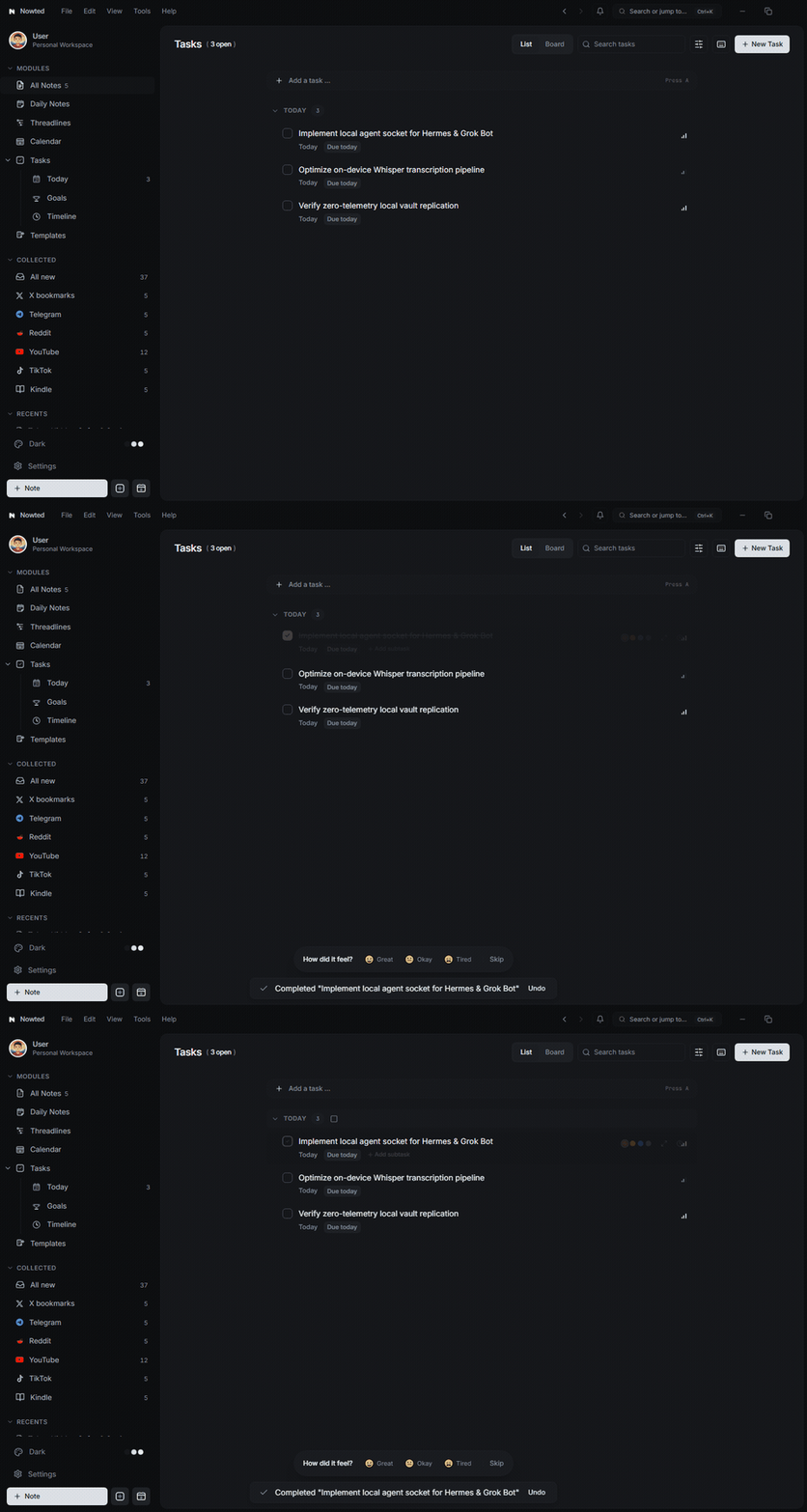
1. The Core Law: A Task Body is a Real Note
In conventional tools, a task is just a single text string with a tiny comment box. The moment you start working on it, you have to open three other apps to find the spec, client brief, or reference links.
In Nowted, every task's description is a full, rich-text note:
- Write comprehensive specs, insert images, format tables, embed PDFs, and organize bullet lists directly inside the task.
- Use bidirectional links (
[[note-title]]) to connect the task to project notes, meeting transcripts, and research documents. - Convert any highlighted text selection in any note into a new task with
Ctrl + Shift + T(⌘⇧T).
When you click on a task, you never wonder why it exists or where your materials are. Your thinking and your execution live in the same place.
2. Dual Viewing Modes: List ⇄ Kanban Board
Different workflows require different perspectives. Nowted allows you to toggle instantly between two visual modes:
- Structured List View: Keyboard-first, dense, and clean. Group tasks by priority, project list, or due date. Use arrow keys and single-key shortcuts (
Dto reschedule,Lfor tomorrow,Pfor priority,Spaceto complete) to navigate and conquer your day without touching the mouse. - Kanban Board View: Spatial drag-and-drop workflow. Organize work across visual stages like Idea, To Do, In Progress, Pending, and Done. Column headers display real-time active task counts and cumulative focus minute tallies so you never overload a single stage.
Nowted•Dual Viewing Modes — Structured List ⇄ Kanban Board Momentum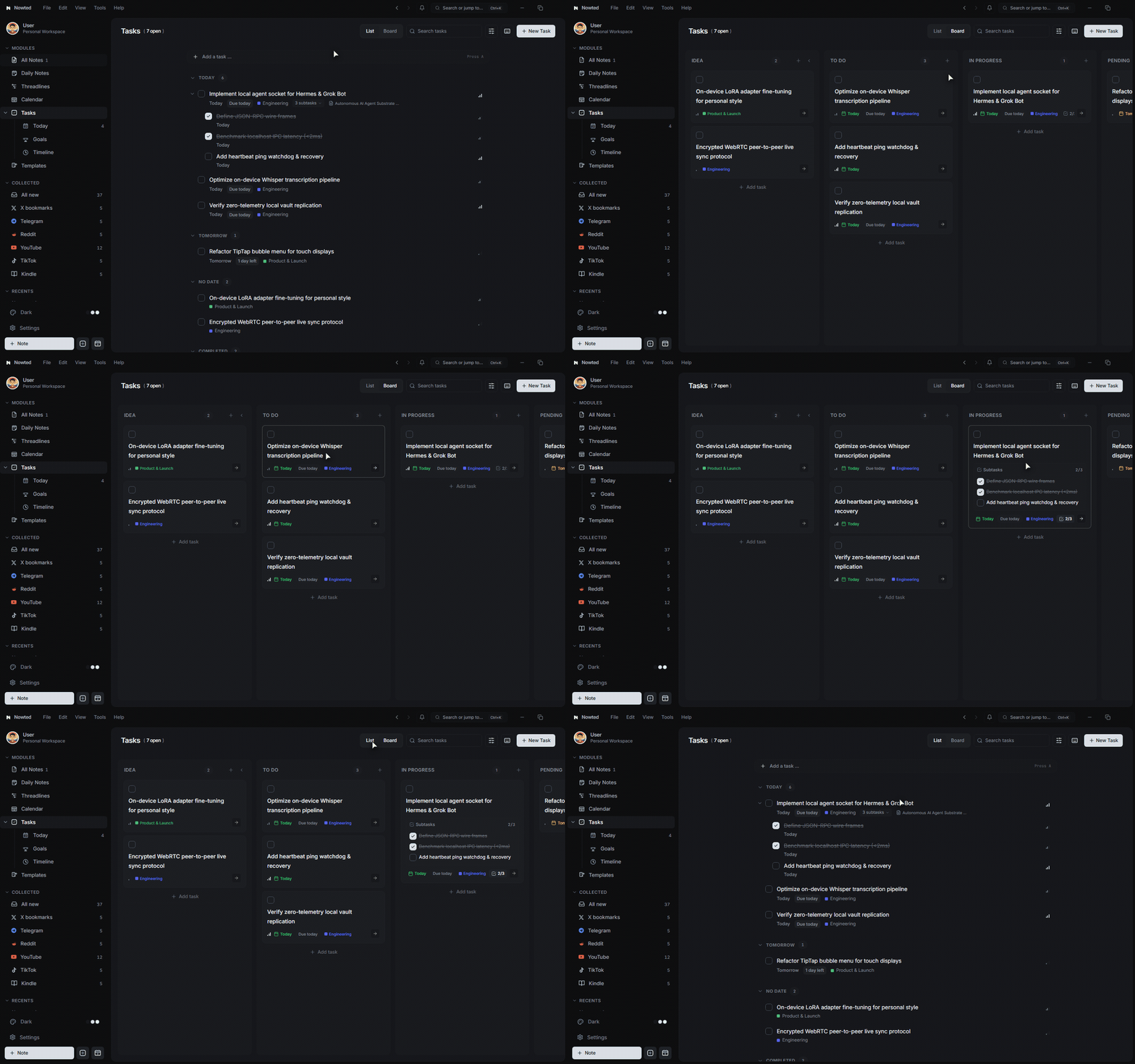
Press V on your keyboard anywhere in the Tasks module (or click the List ⇄ Board toggle in the header) to switch perspectives instantaneously. Because both views are computed projections of the exact same local SQLite state, there is zero reload lag, no re-fetching, and zero lost context.
3. Natural Language Quick Add (NLP)
Adding a task should take less than three seconds. Nowted's quick add input understands natural human phrasing:
Draft product launch announcement tomorrow 3pm p1 #launch
Review investor financial models every friday 10am p2 #finance
Update team on client feedback next monday p3
Nowted automatically parses:
- Due Dates & Times: "tomorrow at 3pm", "next monday", "in 3 days"
- Priority Levels:
p1(Urgent/Red),p2(High/Orange),p3(Medium/Blue),p4(Low/Slate) - Destination Lists:
#work,#personal,#deep-work - Recurrence: "every weekday", "every 2 weeks", "monthly"
A live interactive pill appears beneath the text box before you hit Enter, letting you visually confirm exactly how the date, time, priority, and tags were interpreted.
4. The Anti-Procrastination System
Nowted replaces stress and shame with psychological momentum.
The Idea Column (Zero-Pressure Staging)
Not every thought needs to be done this week. In Nowted, raw ideas sit safely in the Idea column. They have zero deadlines, trigger zero notifications, and impose zero guilt. When you are genuinely ready to execute, you drag what matters into To Do.
Soft Overdue Triage
Life happens, and deadlines shift. When tasks slip past their due date, Nowted does not punish you with glowing red sirens. Instead, an elegant Overdue Triage Banner appears:
- With one click, choose a calm reschedule strategy:
- Move to Today: Clean slate for the current day
- Push to Tomorrow: Protect your evening
- Reschedule for Next Week: Defer until calendar bandwidth clears
- Move to Someday: Preserve the idea without the timeline pressure
If an overdue task is paralyzing you, it usually means the task is too large or lacks clarity. Open the task body, break it into two smaller subtasks, and push the start date to tomorrow.
5. Subtasks & Multiselect Bulk Actions
Nested Subtasks & Checklists
Break complex deliverables into manageable steps. Each subtask can have its own due date and priority, and checking off subtasks updates the parent item's progress indicator in real time.
Multiselect Bulk Actions
Hold Shift or Ctrl (⌘) to select multiple tasks simultaneously:
- Bulk Reschedule: Shift an entire batch of deliverables to a new date in one click.
- Bulk Priority: Re-prioritize selected tasks to P1, P2, P3, or P4.
- Bulk Move: Route multiple items into a different project list.
- Bulk Complete: Clear finished project phases instantly.
6. Smart Lists & Completion Mood Tracking
Curated Smart Lists
- Today: Everything scheduled or due today, highlighted with semantic urgency colors.
- Upcoming: A forward-looking chronological forecast of your week and month.
- Someday: A safe repository for long-term aspirations that you want to revisit during monthly reviews.
- Logbook: An archive of everything you have completed.
Completion Mood & Energy Logging
When you check off a task, an optional one-tap prompt lets you record your Mood (😀 Great, 😐 Okay, 😴 Tired) and Energy (⚡ High, 🔋 Normal, 🪫 Low). Over time, this builds a clear picture of what types of work energize you versus what drains your focus.
7. Global Quick Task HUD & Reminders
Inspiration and obligations arrive while you are browsing, coding, or reading:
- Hit the global quick-add shortcut (
Ctrl+Shift+Space/⌘⇧Space) from anywhere in your operating system. - A minimalist glass HUD appears in the center of your screen.
- Type your task with natural language parsing, press Enter, and the window vanishes without interrupting your active application.
- When deadlines arrive, Nowted delivers clean, non-intrusive native operating system notifications with sound alerts.
Was this guide helpful?
Your feedback helps us continuously refine the documentation.