Time Orchestration & The Calendar
Visually design your days, protect deep focus with drag-and-drop time blocking, and align work with your natural energy.
A to-do list tells you what needs to be done. A calendar tells you when you actually have the time to do it.
When your tasks live in one app and your schedule lives in another, you end up overcommitting. You schedule five hours of meetings and still pretend you have time to finish six heavy tasks.
Nowted's Calendar unites time and execution into an executive cockpit.
 Nowted•Time Orchestration Cockpit — Hourly Sprints & Deep Work Blocks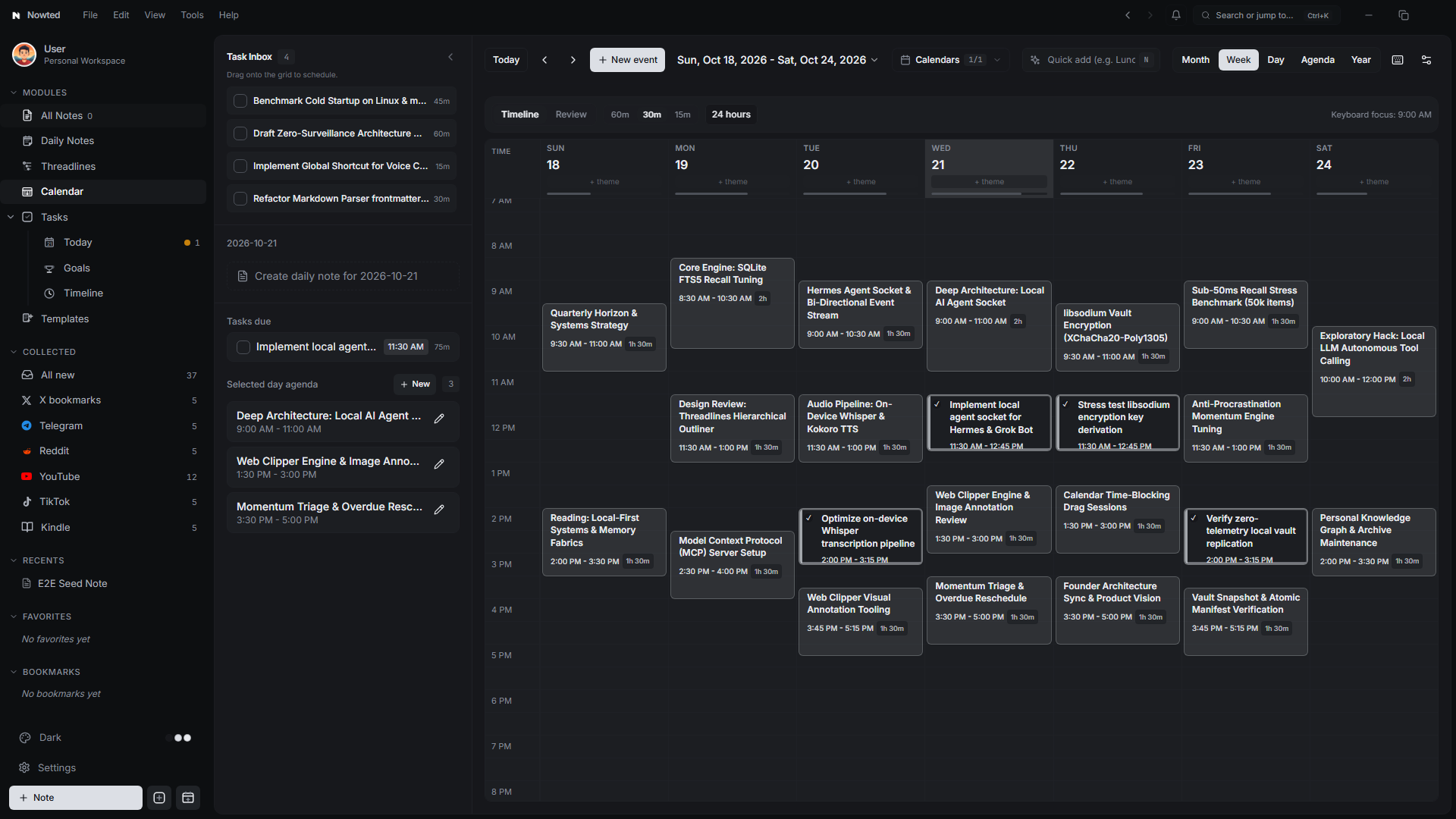
1. Day, Week, and Month Perspectives
Nowted provides four native visual layouts tailored to different planning horizons:
- Day View: An hourly vertical timeline built for intentional focus. See scheduled meetings, blocked deep-work sprints, and immediate priorities side by side.
- Week View: The quintessential productivity view. Balance workload across seven days, spot meeting overload before it happens, and allocate realistic time blocks for complex projects.
- Month View: A high-level calendar grid for spotting major launch dates, quarterly deadlines, travel days, and milestone targets.
- Year View: An annual cockpit for long-term consistency tracking, quarterly planning, and 365-day momentum visualization.
Nowted•Month Perspective — High-Level Milestones, Deadlines & Scheduled Tasks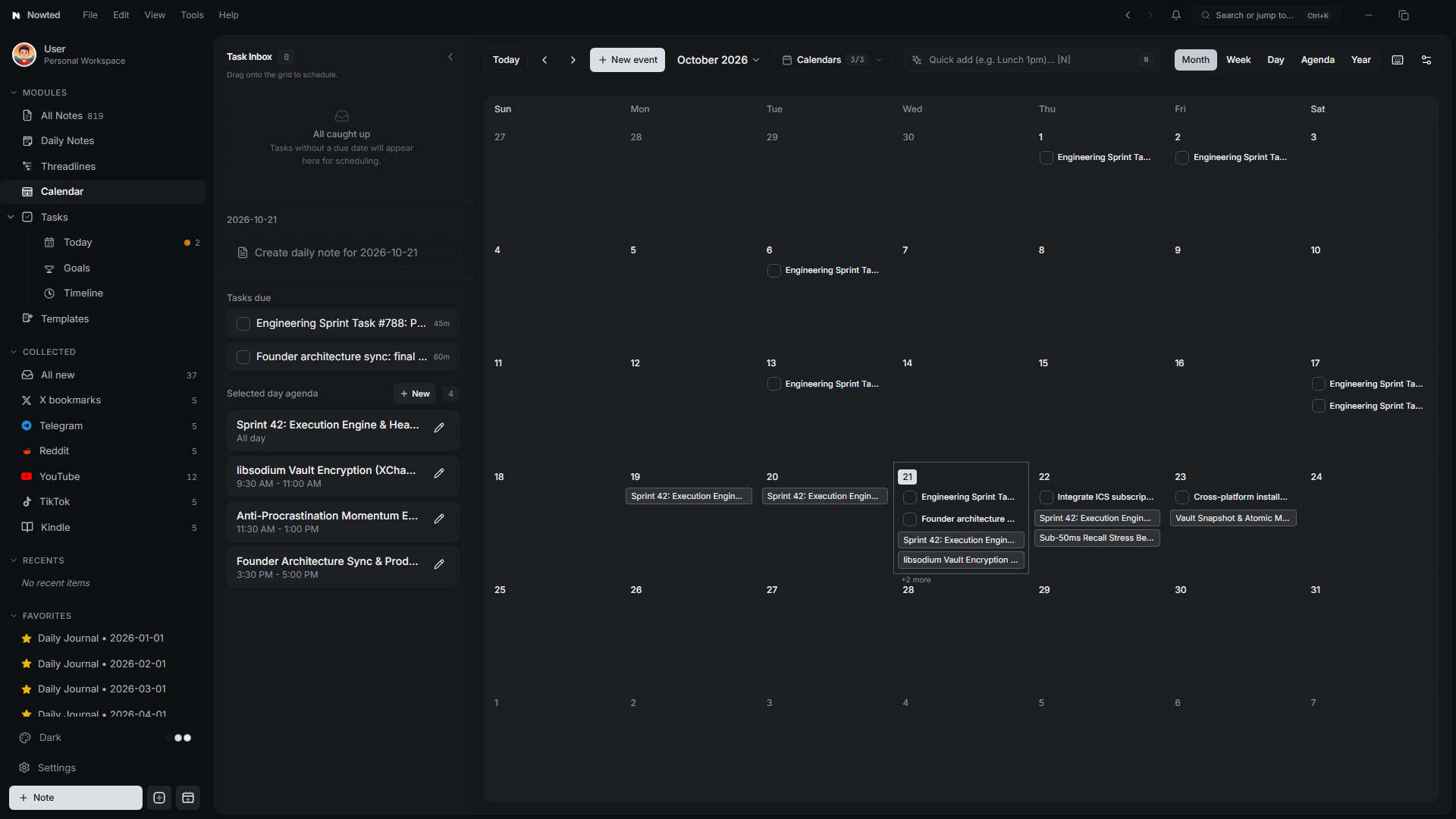
2. Drag-to-Schedule Time Blocking
Time blocking is the single most effective method for ending distraction. Instead of hoping you will find time for high-leverage work, you deliberately defend it on your schedule.
The Unscheduled Tasks Drawer
- Open the Calendar view.
- Click the Unscheduled Tasks drawer on the right. A clean sidebar reveals all tasks that need your attention.
- Drag and Drop: Simply drag any task from the drawer and drop it directly onto the hourly calendar grid.
- Interactive Resizing: Hover over the bottom edge of the newly scheduled block and drag to expand it from 30 minutes to a 90-minute deep-work session.
When you check off a task from the calendar, the block updates with a clean completed state, recording your progress directly on your historical timeline.
Scheduled tasks remain fully linked to their parent notes. If a meeting shifts, drag the block to another afternoon or drag it back into the unscheduled drawer.
3. Calendar Day Themes: Matching Energy to Output
Trying to force intense creative writing when you are mentally exhausted from back-to-back meetings is a recipe for frustration.
Nowted introduces Day Themes:
- Tag each day with a dedicated focus:
- Deep Work: Dedicated to un-interrupted building, coding, writing, or design.
- Admin & Ops: Clearing invoices, email backlog, scheduling, and logistical tasks.
- Strategic Review: High-level quarterly planning, financial modeling, and goal retrospectives.
- Personal & Rest: Recharging, family, health, and offline activities.
When a Day Theme is active, tasks matching that theme automatically surface to the top of your suggested queue, helping you work with your natural biological rhythms instead of fighting them.
Designate Tuesdays and Thursdays as "Deep Work" days with zero meetings. Block out 3-hour morning sprints in Nowted and watch your creative output multiply.
4. External Calendar Integration
Nowted easily connects with your existing schedule:
- ICS Import & Subscriptions: Subscribe to standard calendar feeds (
.ics) to view your work and personal commitments directly on the Nowted grid. - Local Calendar Privacy: Calendar events are parsed and stored locally on your device. Nowted does not track your meetings or upload your schedule to external servers.
- Meeting Notes in One Click: Click on any scheduled event to generate a dedicated meeting note with attendees, timestamps, and an integrated action items list.
5. Year Consistency Heatmap & "Look Back" Retrospective
Nowted is built around a fundamental truth: consistency compounds. Seeing your cumulative effort over weeks, months, and years turns abstract ambition into undeniable daily momentum.
The 365-Day Consistency Heatmap
Switch to the Year View and toggle into Streak Mode to unlock an executive visual matrix of your productivity:
- 53-Week Activity Matrix: Every day you complete tasks, log voice notes, or write project updates, your heatmap illuminates with density color coding (from subtle chip to rich emerald primary hue).
- Core Momentum Metrics:
- Longest Streak: Celebrate your multi-week consistency streaks and push to beat your personal best.
- Current Streak: Keep daily momentum alive with immediate visual feedback.
- Active Days: Track your cumulative productive days across the entire 365-day year.
- Task Completion Velocity: Live completion percentage across all assigned sprint items.
- Distribution Analytics: Visual breakdown panels reveal your peak weekday output and month-by-month progress.
- Integrated Day Inspector: Click any square in the 365-day matrix to inspect the exact ledger of events, deep-work sprints, and completed tasks for that day without leaving the view.
Nowted•The 365-Day Consistency Heatmap — 53-Week Activity Matrix & Streak Analytics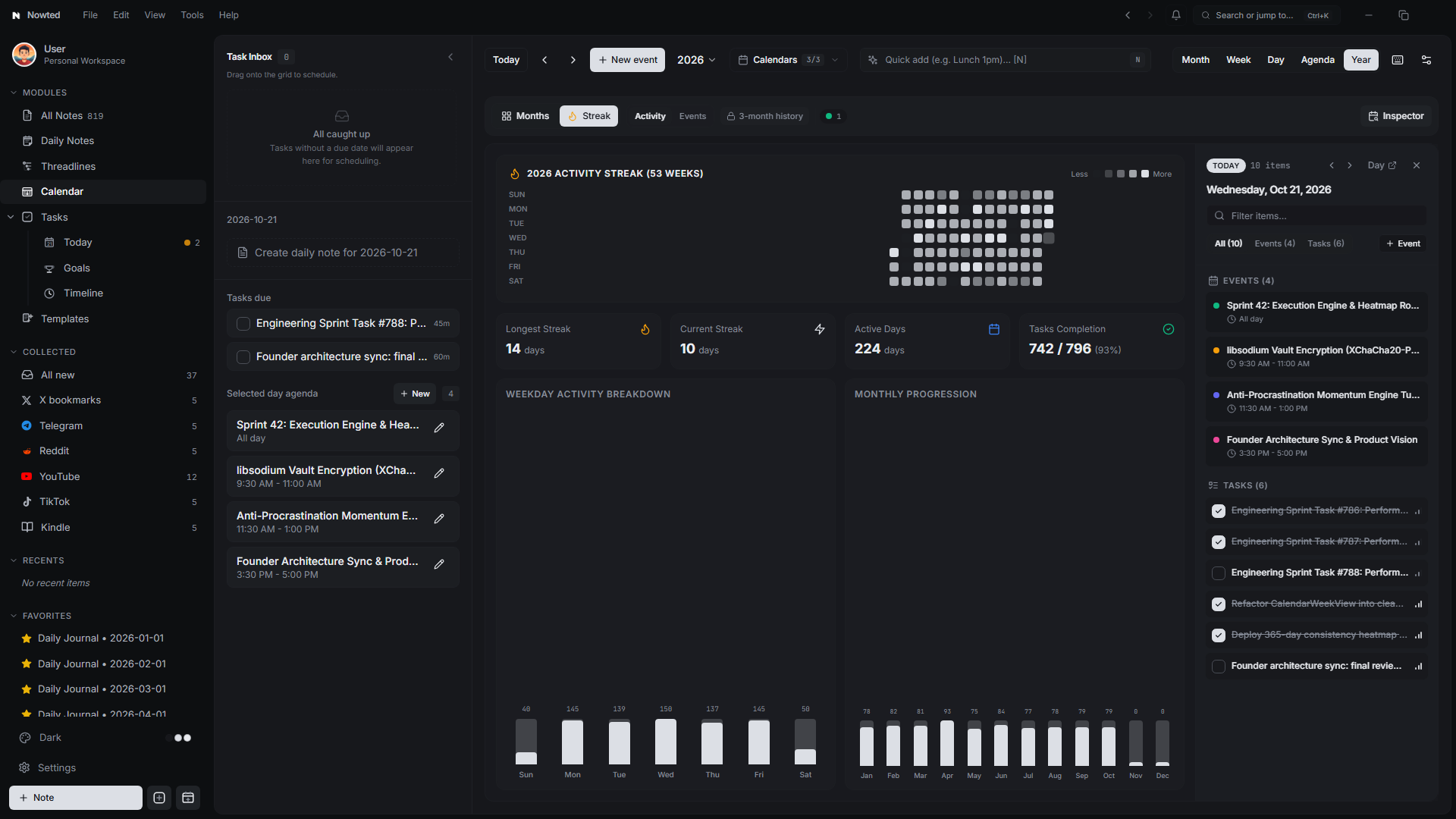
Retrospective "Look Back" Mode
Planning your future is only half the battle; acknowledging your progress is what sustains long-term motivation. When Friday comes, most knowledge workers feel an unsettling sense of "What did I actually get done this week?"
Toggle into Review Mode (Look Back) in the Week View toolbar:
- The Achievement Ledger: Normal hourly time grids are replaced by an intentional daily balance sheet detailing:
- Notes Created: Highlighting fresh intellectual output, project specs, and meeting captures.
- Notes Edited: Demonstrating refinement and progress on existing knowledge bases.
- Tasks Completed: A verified count of finished deliverables and milestones.
- Direct Daily Note Links: One-click navigation straight into that day's reflective journal.
- Peace of Mind by Default: Close your laptop on Friday afternoon knowing exactly where your hours went, with objective proof of everything you achieved.
Nowted•Retrospective 'Look Back' Ledger — Weekly Proof of Progress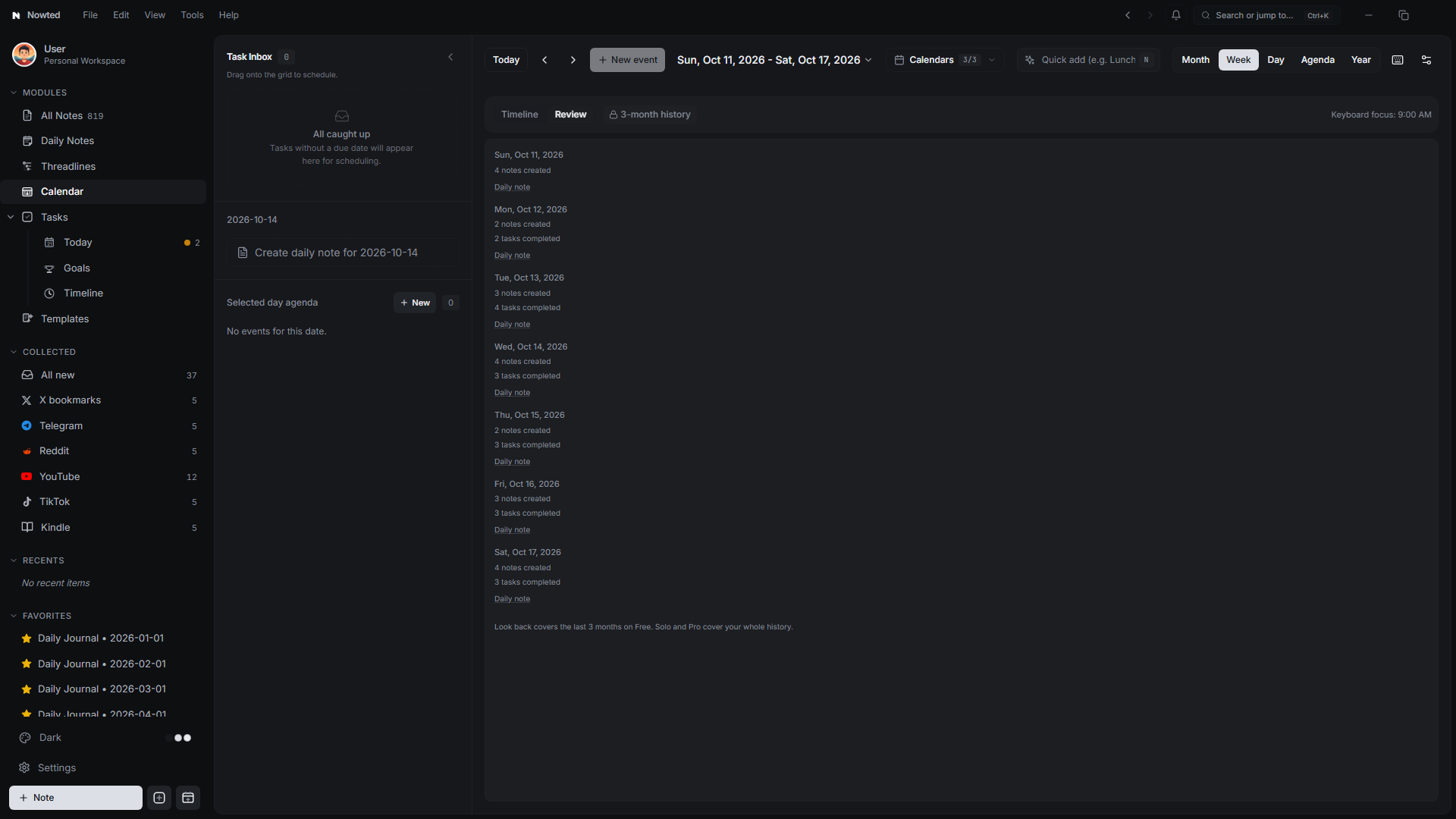
Was this guide helpful?
Your feedback helps us continuously refine the documentation.
The Complete Tasks & Execution Engine
A high-performance execution engine where tasks aren't shallow checkboxes—they carry their full intellectual context, linked notes, and momentum.
Strategic Horizons & Goals
Reverse-engineer your biggest ambitions into daily momentum, with live progress bars, Day-N tracking, and retrospective timelines.