Import from Other Apps
Bring your notes, notebooks, tags, and attachments from Evernote, Joplin, Obsidian, and Markdown into Nowted.
Switching to a local-first workspace shouldn't mean leaving years of knowledge behind or spending weeks manually copying and pasting documents.
Nowted includes native in-app import options to bring your existing archives into your local vault. Documents are converted directly into clean, portable Markdown files with images, attachments, tags, and folder structures preserved on your local disk.
 Nowted•Import Notes Wizard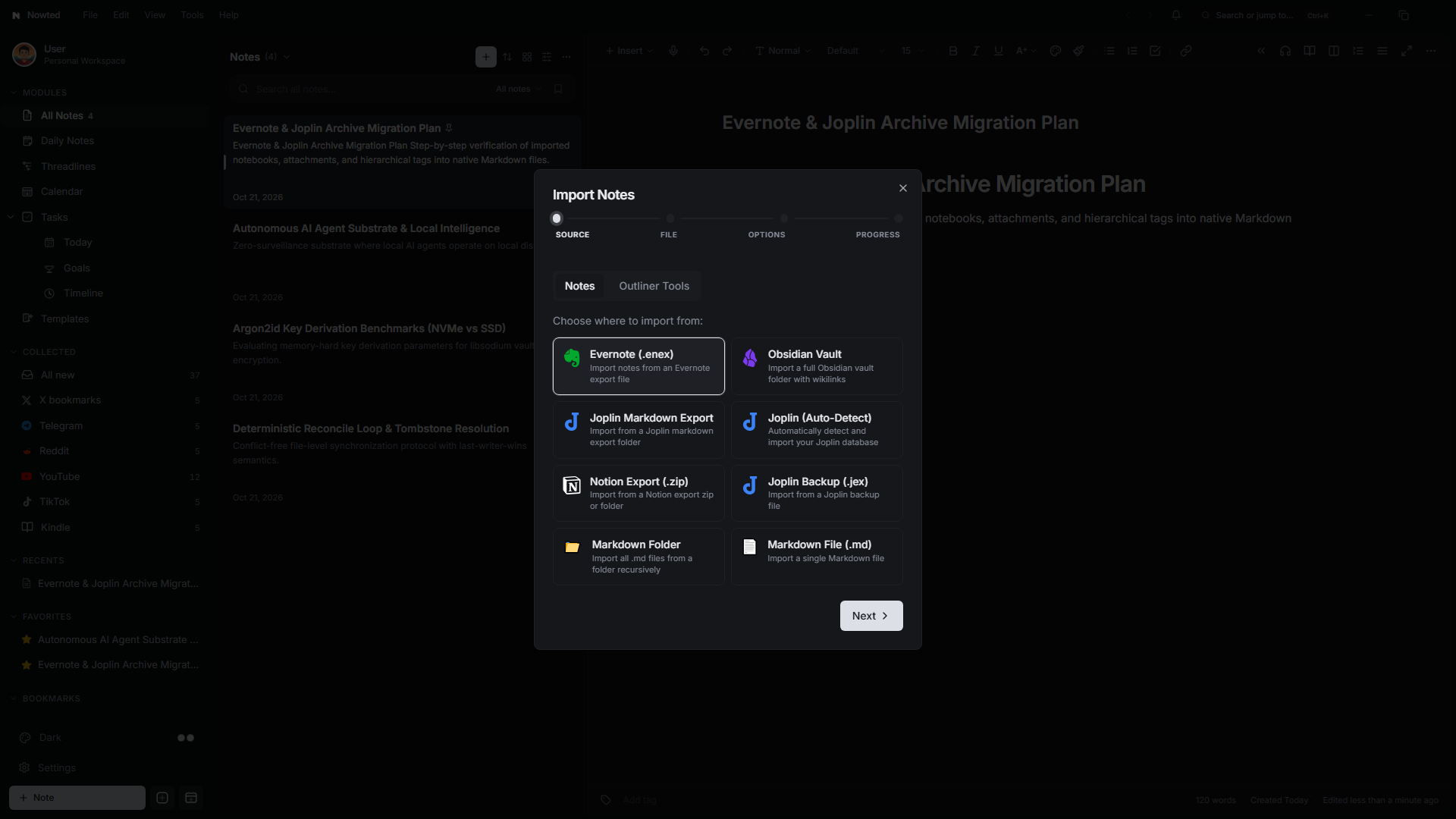
Supported Import Formats
Nowted currently supports direct imports from the following formats, with imports from other applications planned and actively being developed:
1. Evernote (.enex)
Export your notebooks from Evernote as .enex files and bring them straight into Nowted:
- Notebook & Tag Preservation: Retains notebook organization, creation dates, update timestamps, and tags.
- Embedded Media & PDFs: Images, PDF documents, and audio attachments are extracted directly into your vault's local attachment directory and linked cleanly in Markdown.
- HTML to Markdown Sanitization: Translates Evernote's internal ENML format into standard, human-readable Markdown without proprietary markup.
2. Joplin
Migrate seamlessly from Joplin using multiple ingestion methods:
- Joplin (Auto-Detect): Automatically discovers your local Joplin desktop installation and imports your notes, notebooks, and tags directly.
- Joplin Backup (
.jex): Point Nowted to an exported.jexarchive bundle for an offline import without needing Joplin open. - Joplin Markdown Export: Ingests folders created with Joplin's "Export as Markdown + Frontmatter" option.
3. Obsidian & Markdown Vaults
- Obsidian Vault Import: Select your existing Obsidian directory. Nowted preserves internal
[[wikilinks]], folder structures, tags, and frontmatter. - Markdown Folders & Files: Point to any folder containing
.mdfiles (or a single Markdown document) to import them into your active notebook.
4. Notion (.zip)
- Export your workspace or specific pages from Notion as a
.ziparchive. - Nowted unzips the structure, converts page hierarchies into local notebooks, and copies linked media into local attachments.
5. Outliner Hierarchies (.opml)
Under the Outliner Tools tab in the Import dialog, you can import standard .opml files exported from Dynalist, Workflowy, or MindNode into Nowted's Threadlines outliner.
How to Import Your Notes
Running an import takes only a few seconds:
Step 1: Open Import Wizard
Open Settings or choose File → Import Notes from the native window menu:
Press Ctrl + , and navigate to the Import section.
Step 2: Choose Your Source Application
Under Choose where to import from, select your source platform (Evernote (.enex), Joplin, Obsidian Vault, Notion, or Markdown).
Step 3: Select Archive File or Directory
Click Next and browse for your exported archive or vault directory using your operating system's native file picker.
Step 4: Choose Target Notebook
Select the destination notebook or folder inside your local Nowted vault where the converted documents should be placed.
Step 5: Execute 100% Local Ingestion
Click Start Import. Nowted parses your files, extracts attachments to your local disk, sanitizes markup into standard Markdown, and indexes everything into SQLite FTS5 for instant search.
All import parsing and conversion runs locally on your machine. Your archives, notes, passwords, and private attachments never touch any remote server or cloud relay.
Expanding Import Support
We are committed to making Nowted the most accessible local-first knowledge base. We are actively building additional direct importers for Apple Notes, OneNote, Bear, Google Keep, and other popular note systems.
Because Nowted stores all notes as plain Markdown files on disk, you can also copy or move existing Markdown files or folders directly into your vault directory, and Nowted will index them immediately.
Was this guide helpful?
Your feedback helps us continuously refine the documentation.