
Local Voice Intelligence
High-fidelity on-device speech transcription with Whisper and natural human voice reading with Kokoro AI.
Voice is the most natural, high-bandwidth input and output mechanism humans possess. Yet most productivity software either ignores voice entirely or charges you expensive recurring monthly fees to stream your private audio to cloud servers.
Nowted brings speech intelligence directly to your local computer.
 Nowted•Real-Time Voice Recording & Live Speech Streaming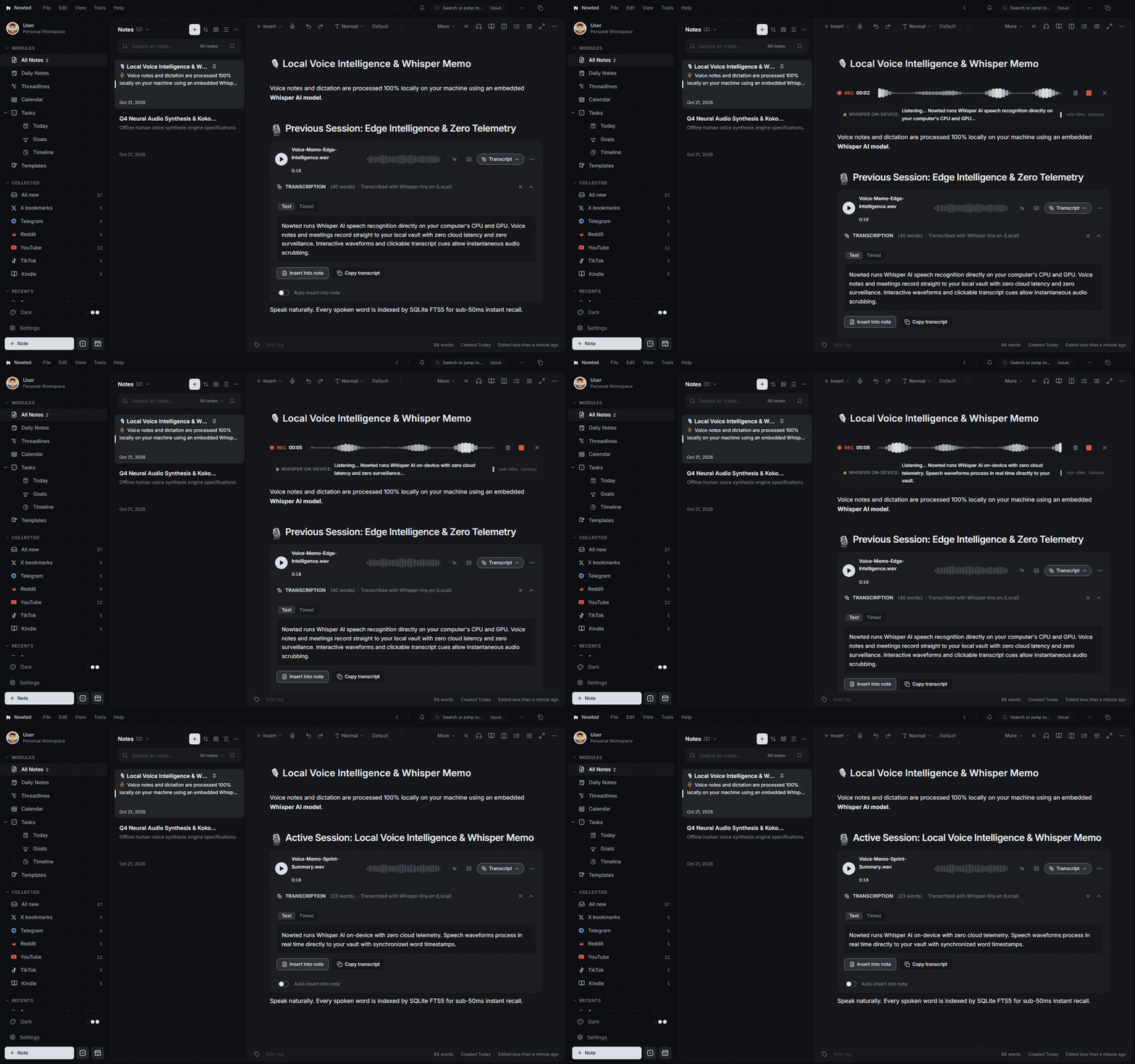
1. On-Device Voice Transcription (Whisper AI)
Whenever you record audio in Nowted—whether a quick voice memo, a project brainstorm, or a meeting recording—Nowted transcribes your words into clean, punctuated text using an embedded Whisper AI model:
- Real-Time Live Streaming: See words appear on your screen as you speak, with live pulsing status indicators and bouncing soundwave amplitudes.
- Completely On-Device: The AI model runs directly on your computer's CPU and GPU—no subscriptions, no API tokens, no rate limits.
- Zero Cloud Latency: Transcripts generate immediately without queuing on remote servers or leaking private voice telemetry.
- Interactive Transcript Panel: Every recording creates an attached transcript panel with clickable timestamps (
Timedview) that jump playback directly to that millisecond. - Sub-50ms Searchable Audio: Because transcripts are stored in plain text alongside your notes, every word spoken in any voice note is instantly discoverable via
Ctrl + K.
Nowted•Live Recording Banner, Whisper AI & Interactive Waveform Player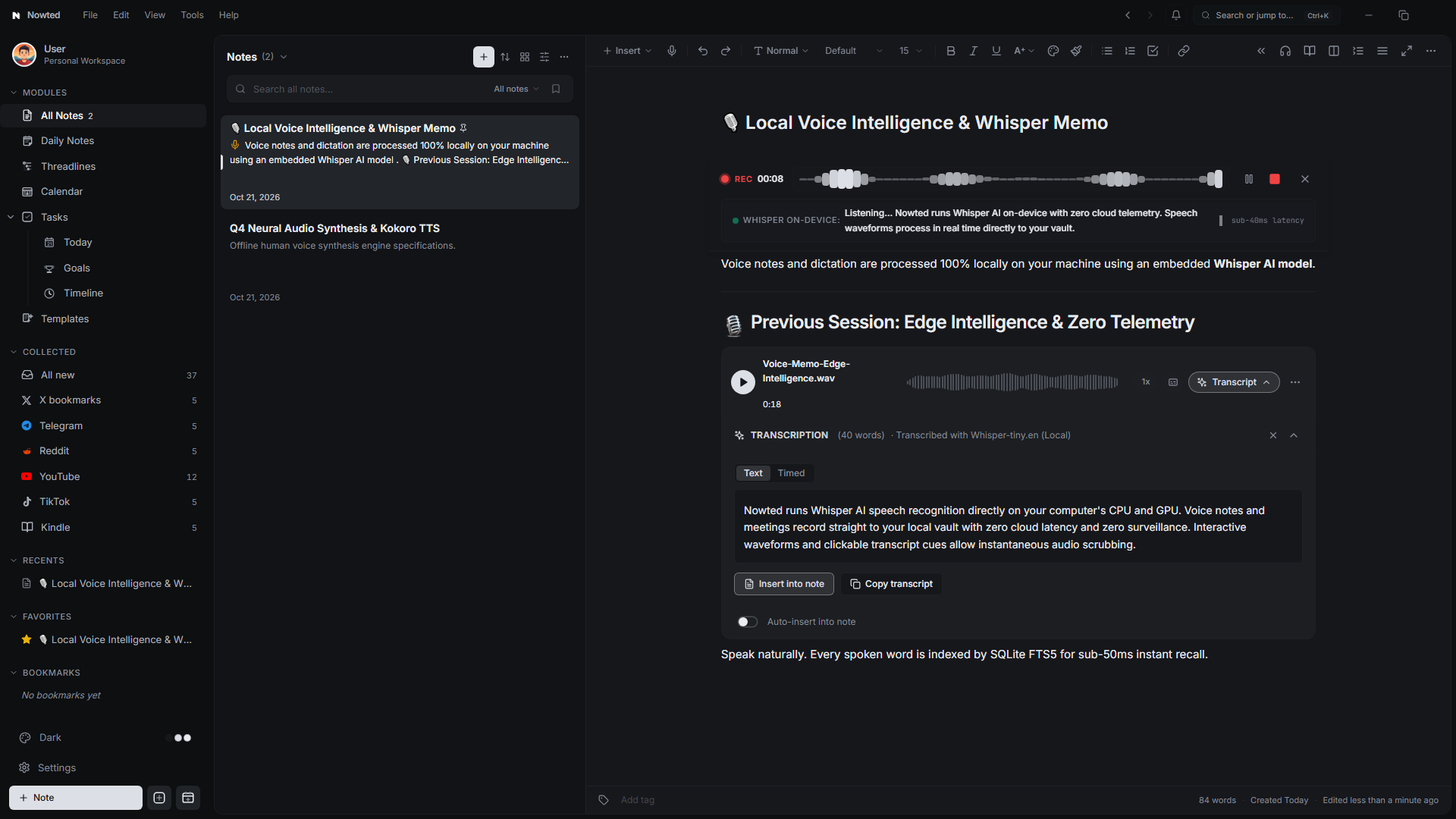
Your audio recordings are confidential assets. Nowted ensures that your raw audio files and generated transcripts never touch an external server or training dataset.
2. Transform Any Note into a Private Audiobook (Kokoro AI & Speechify)
Staring at illuminated glass for eight hours a day drains your cognitive reserves. When reviewing dense project briefs, 5,000-word research clips, or complex meeting summaries, forcing your tired eyes to parse line after line creates friction and slows comprehension.
Nowted changes the equation by turning your entire workspace into a private, studio-grade audio streaming platform. Instead of paying $139/year for cloud text-to-speech tools that harvest your private writing, Nowted equips you with dual voice synthesis engines: 100% on-device Kokoro AI and optional Speechify Bring-Your-Own-Key (BYOK) cloud integration.
Nowted•Real-Time Kokoro Voice Reading & Synchronized Sentence Highlighting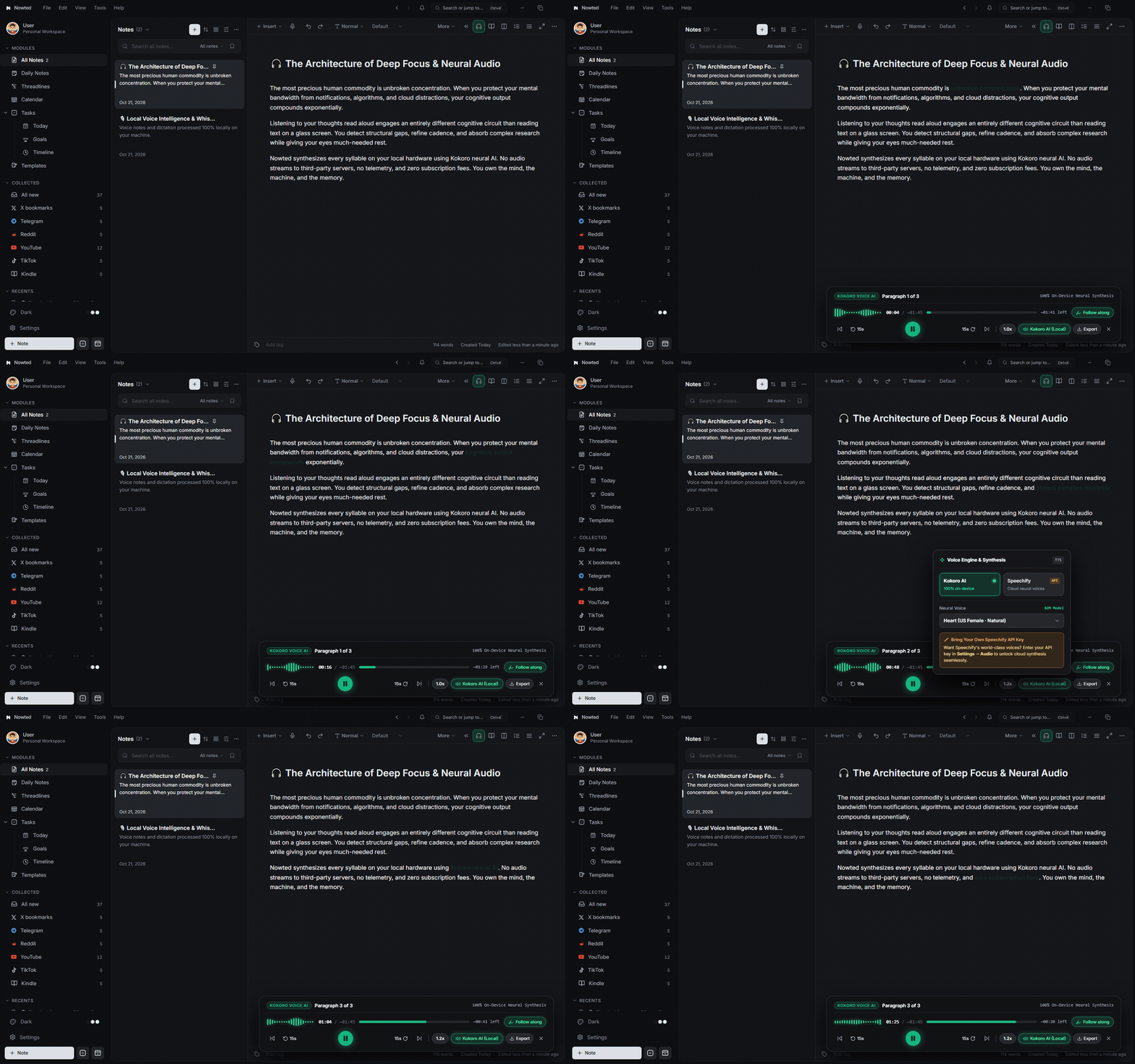
How to Start Listening in Seconds
- Open Any Note: Click on any note in your workspace or open a clipped web article.
- Launch the Voice Reader: Click the Headphones icon in the editor toolbar, press
Alt + L(⌥Lon macOS), or triggerCtrl + K→ Listen to Note. - Immerse in the Audio: The floating glass audio dock smoothly glides into view at the bottom of the editor, immediately beginning playback with fluid, bouncing soundwaves.
- Follow Along Effortlessly: As the narrator speaks, Nowted dynamically paints each spoken sentence with a crisp emerald glow and highlights the active word. Click any sentence in your note to instantly jump audio playback directly to that thought.
On-Device Kokoro AI: Broadcast-Quality, 100% Local, Zero Subscriptions
At the heart of Nowted's reading experience is Kokoro TTS—an 82-million parameter neural speech model that runs entirely on your local CPU and GPU.
- Lifelike Human Intonation: Kokoro breathes, pauses naturally at punctuation, and delivers articulate, nuanced cadence instead of the robotic drone of traditional desktop screen-readers.
- Infinite Free Listening: Zero rate limits, zero monthly subscriptions, and zero paywalls. Listen to a 300-page book or 50 research papers back-to-back without spending a penny.
- Offline Sovereignty: Works entirely without an internet connection. Read and listen while flying at 35,000 feet, riding the train, or working in a remote cabin.
- Speed & Voice Customization: Fine-tune playback speed from
0.5xall the way to3.0xfor high-speed knowledge absorption, and switch between rich male and female voice timbres.
Unlike cloud TTS services that upload your confidential drafts to remote servers for speech rendering, Kokoro generates audio directly in your device memory. Your intellectual property never leaves your machine.
Speechify Integration: Unlock Celebrity & Premium Neural Voices (BYOK)
For moments when you want Hollywood-caliber narration or specialized celebrity voices, Nowted includes first-class support for Speechify Bring-Your-Own-Key (BYOK).
Rather than locking you into expensive bundled subscriptions, Nowted connects directly to Speechify's official developer API using your personal API key. You get world-class neural voices while paying only for the raw API credits you consume.
Nowted•Multi-Engine Synthesis Dock: Kokoro Local AI & Speechify Cloud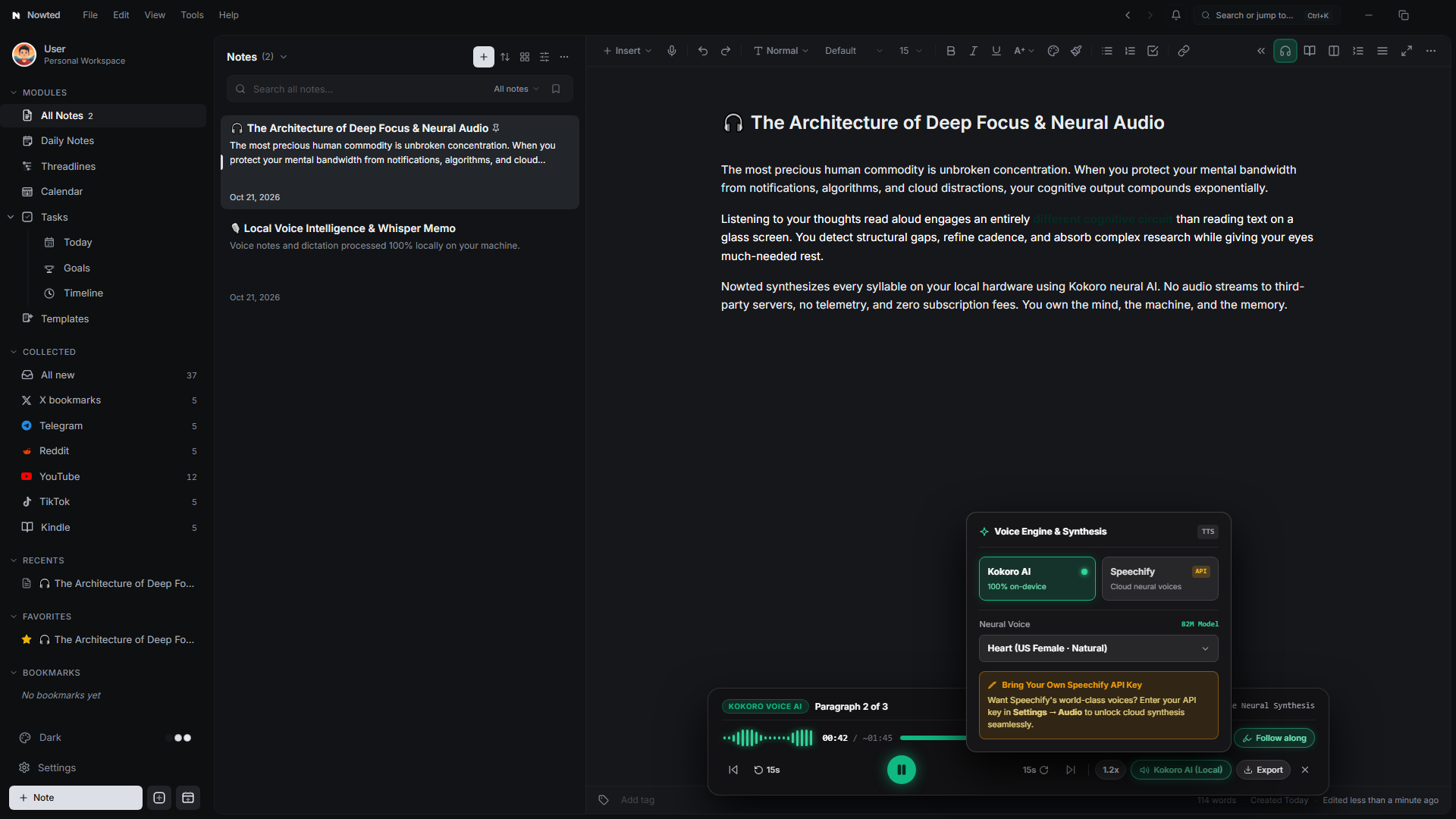
Connecting Your Speechify Key
- Click the Voice Engine pill (e.g.,
Kokoro AI (Local)) in the floating audio player dock, or navigate to Settings (Ctrl + ,) → Audio. - Select Speechify as your active speech engine.
- Paste your Speechify API Key into the secure credentials field.
- Choose from Speechify's extensive catalog of natural voices. Nowted will instantly stream speech through the same synchronized player interface with zero workflow disruption.
By using your own Speechify API key, you bypass middleman markups and expensive recurring subscriptions. Enjoy world-class voice AI while keeping complete ownership of your tools and data.
One-Click Audio Export (MP3 & WAV)
Want to step away from your desk completely? Nowted lets you take your notes with you wherever life happens:
- 1-Click Export: Click the Export button in the audio player dock to generate an MP3 or WAV file of your entire note or article.
- Offline Podcast Feed: Drop the exported audio into your phone, strap on your running shoes, and absorb 4,000-word industry research papers while jogging, commuting, or doing chores.
- Clip an insightful 4,000-word analysis with the Nowted Web Clipper.
- Open Nowted, hit
Alt + L, and click Export Audio. - Transfer the MP3 to your mobile device and turn your afternoon walk into a high-leverage learning session.
3. Creating Voice Outlines in Threadlines
The human brain formulates thoughts at over 150 words per minute, but the average person types at barely 40 words per minute. Whenever inspiration strikes or a complex project architecture crystalizes in your mind, forcing yourself to type through keyboard bottlenecks fractures your flow state.
Even worse, standard voice dictation tools dump a massive, unpunctuated wall of text onto your screen that takes 20 minutes to read, clean up, and structure.
Voice Outlines in Threadlines solves this permanently. By uniting on-device Whisper AI with Nowted’s hierarchical outliner, you simply speak your thoughts aloud, and Nowted instantly formats your spoken stream of consciousness into a clean, indented, actionable bullet tree—complete with an embedded audio player and timestamped playback.
Nowted•Real-Time Voice Dictation & Auto-Indented Outline Tree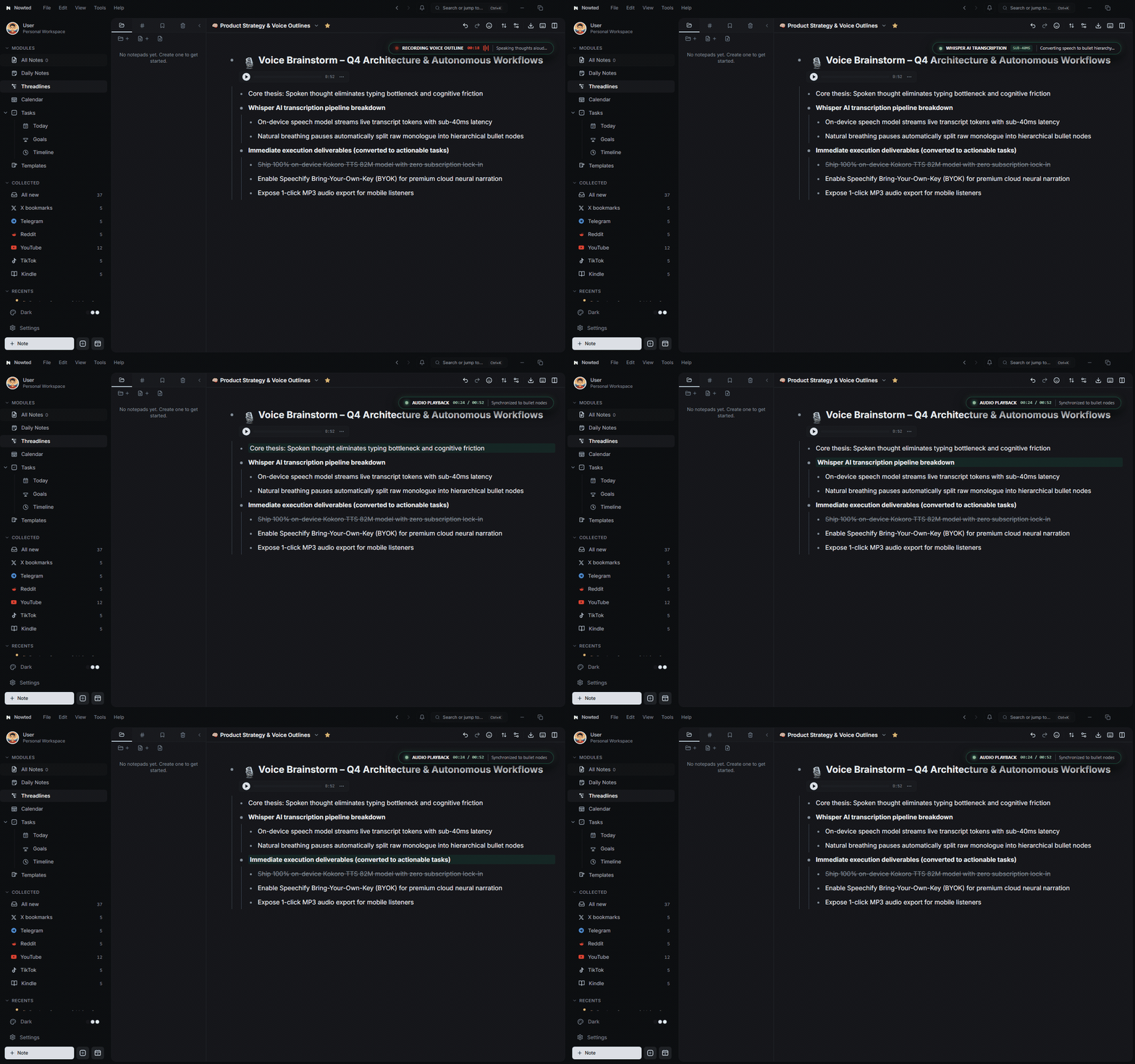
Speak in Stream-of-Consciousness. Get Structured Thinking.
- Trigger Global Voice Capture: Hit
Ctrl + Alt + Shift + K(⌃⌥⇧Kon macOS) from anywhere on your operating system, or click Threadlines in the left sidebar and select the microphone button. - Dictate Naturally: Speak your thoughts, ideas, or meeting takeaways. Don't worry about formatting or syntax—Whisper automatically detects natural breathing pauses, punctuation cues, and topic transitions.
- Instant Hierarchical Structuring: When you finish speaking, Nowted instantly converts your monologue into an organized hierarchy of bullet nodes:
- Parent Thought Node: Displays the core topic, timestamp, and an embedded Compact Audio Player.
- Child Breakdown Bullets: Splits supporting arguments and technical details into cleanly indented sub-bullets.
- Action Checkboxes: Identifies deliverables and renders them as interactive tasks.
Embedded Audio Player & Bi-Directional Seeking
Text transcripts alone often strip away the vocal inflection, conviction, and emotional nuance of your original brainstorm. That’s why Nowted automatically embeds the actual recording directly inside the parent outline node:
Nowted•Hierarchical Voice Outline with Compact Audio Player & Sub-Tasks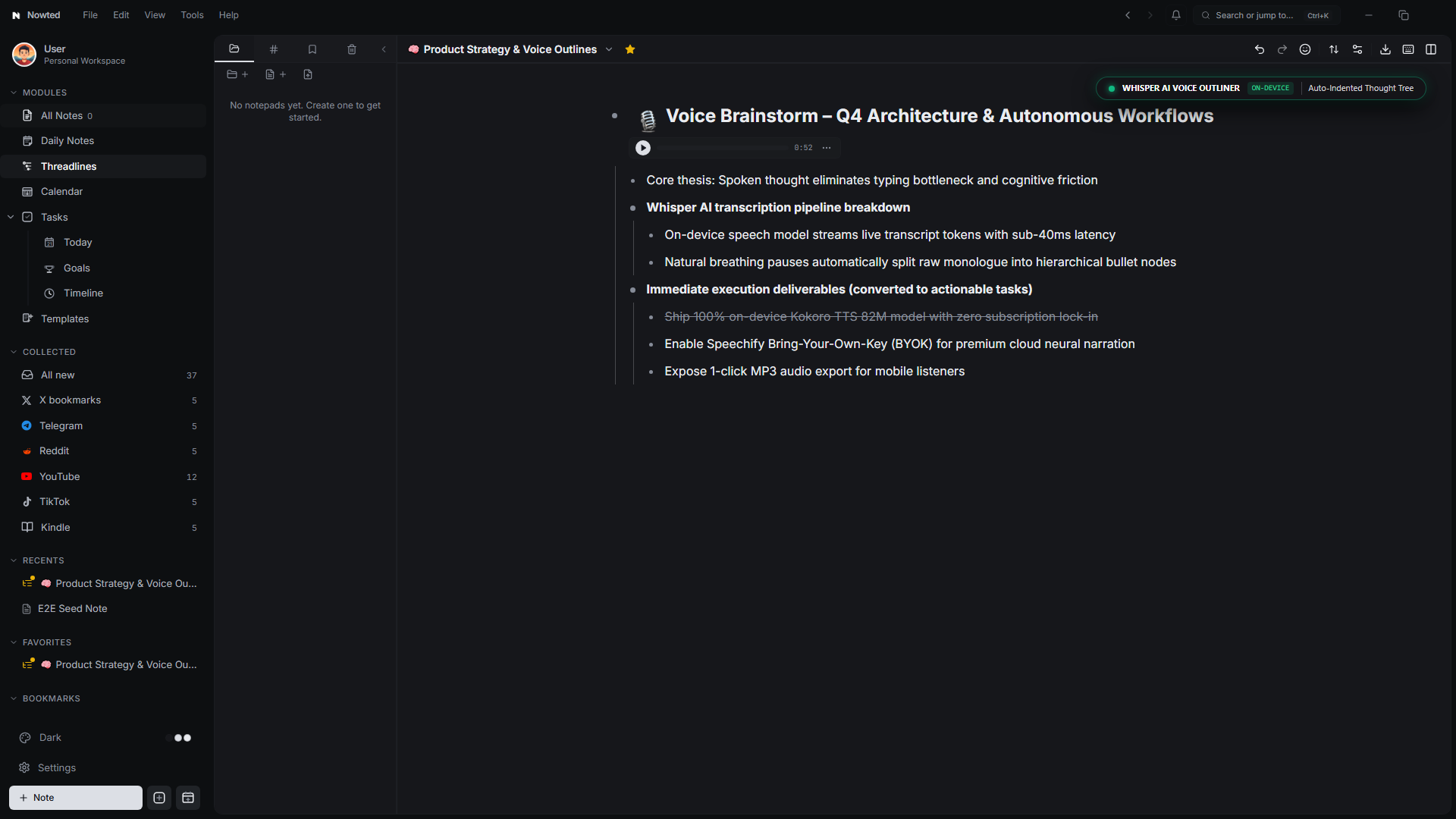
- Inline Compact Player: Listen back to your exact recording with a single click (
▶ 00:52), scrub through the waveform, or download the audio file for your team. - Click-to-Seek Synchronization: Click any transcribed bullet point in the tree to automatically jump audio playback directly to that specific phrase.
- Infinite Flexibility: Because it lives inside Threadlines, you can press
Tab/Shift + Tabto adjust bullet indentation, drag items to restructure priorities, or hitCtrl + Enterto turn any spoken thought into an active checkbox task.
Next time you face a difficult strategy document or engineering decision, don't sit trapped staring at an intimidating blank screen.
Put on your headphones, start a Voice Outline with Ctrl + Alt + Shift + K, and walk around your room or office speaking your ideas out loud. In two minutes, you'll have an articulated, 4-level deep hierarchical roadmap ready to execute.
Just like voice reading with Kokoro, voice transcription in Threadlines uses an embedded Whisper model running locally on your hardware. Your confidential business plans and private ramblings never touch an external server or AI training pipeline.
Was this guide helpful?
Your feedback helps us continuously refine the documentation.
The Editor & Media Studio
A distraction-free craftsman studio for writing, annotating media, embedding rich documents, and presenting your thinking.
The Complete Tasks & Execution Engine
A high-performance execution engine where tasks aren't shallow checkboxes—they carry their full intellectual context, linked notes, and momentum.